Speeding up your website with Laravel — while keeping your WordPress admin

Faster site, same WordPress admin. We moved the storefront to Laravel for speed and stability—simpler caching, reliable forms and CRM, better Core Web Vitals, and improved Google Search results.
A real-estate company ran a content-heavy WordPress site that had grown slow and fragile over years of plugin sprawl. Their non-negotiable: do not change the editorial workflow in WordPress. We rebuilt the public storefront on Laravel — same database, same admin, dramatically faster pages — without disrupting the team or their search rankings.
The challenge and why it mattered
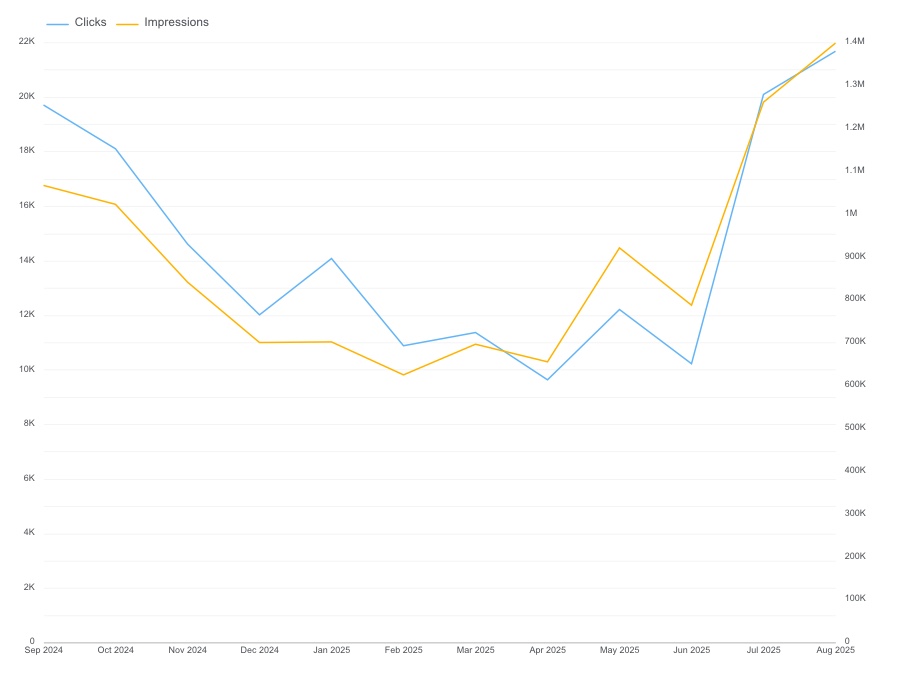
As new plugins piled up and front-end code grew, pages took longer to load and caching became brittle. Forms hesitated before sending, and interactive elements felt heavy — all of which costs conversions. On top of performance pains, we saw traffic declining and Google ranking slipping (fewer clicks/impressions, softer CTR, and a worse average position).
At the same time, the content team relied on WordPress daily and couldn’t afford to relearn tools.
That set a clear goal both business and editorial could rally around: make the site fast and reliable again, restore growth in search, and keep WordPress exactly as it is for editors.
The approach: Laravel storefront, WordPress backend
We moved the public layer to Laravel for speed and stability, while the CMS and content remained in WordPress. Laravel reads from the existing WordPress database through a light integration layer — custom Eloquent models mapped to the wp_posts and wp_postmeta tables, with a thin service class that normalizes WordPress’s flexible schema into typed objects Laravel controllers can work with.
This means editors keep working “as yesterday,” and visitors experience “how much better it is today.” The architecture preserves URLs and metadata, minimizing SEO risk. Because Laravel handles routing independently, we could implement route caching and response caching without conflicting with WordPress plugins — something that had caused intermittent cache-busting on the old stack.
For teams considering a similar setup, we documented our approach in more detail on our API integrations and tech advisory service pages.
What we changed — in plain language
To achieve visible and measurable gains, we focused on improvements that users and search engines feel immediately.
- Leaned out pages. We removed jQuery and redundant scripts. Pages got lighter, visual jitter dropped, and mobile loads felt snappier.
- Made forms dependable. We rebuilt contact forms and added a light integration with Follow Up Boss so leads go straight to the CRM without delay.
- We delivered an interactive map and streamlined browsing for property listings. Instead of endless scrolling, visitors filter by area and jump to the right listing in two clicks.
- Simplified caching. The old WordPress full-page cache broke whenever a plugin updated content behind the scenes. We replaced it with a clear, predictable caching strategy at the Laravel layer — tagged cache entries that invalidate only when their source data changes.
- On the database side, we cut unnecessary SQL queries and removed repeated calls. Peak-hour response times dropped from several seconds to under 400 ms.
- Kept SEO intact. URLs, metadata, and agreed rules stayed in place. Search engines still “see” the same site — just faster and more stable.
What users felt — and what the business gained
Speed isn’t just a score; it’s fewer early bounces, more pages viewed, and a higher likelihood to submit a form.
The map improves findability, forms deliver leads to the CRM reliably, and support spends less time on firefighting. Meanwhile, editors notice no change at all — WordPress remains the daily workspace.
Proof in numbers: before and after the Laravel rebuild
We highlight the release date in all reports so it’s clear where the trend turns.
Before the Laravel rebuild, the WordPress-only site scored in the mid-50s on mobile PageSpeed, with an LCP above 5 seconds and layout shifts that failed Core Web Vitals. After the switch:
- PageSpeed: Mobile — 96/100 (was ~55), Desktop — 95/100 (was ~72)
- Core Web Vitals (field): LCP — 2 s (was 5.1 s), INP — 57 ms, CLS — 0.06 (was 0.28)
The chart below marks the Laravel storefront release date (25 April 2025) so the before-and-after is visible in Google Search Console data as well.
Why the release was calm
We planned a quiet deployment window, set up monitoring and a rollback path. For editors, the release day looked like any other: the WordPress admin didn’t change. For visitors, pages felt noticeably faster. For sales, leads flowed into Follow Up Boss as expected.
This particular project proved that you don’t have to abandon WordPress to get a fast site. The editorial team kept their familiar admin, the real-estate listings loaded in under two seconds on mobile, and within three months Google Search Console showed the ranking trajectory climbing back. If your WordPress site is slowing down and your team can’t afford a full replatform, a Laravel storefront might be the pragmatic middle ground.
Can I keep my WordPress admin and use Laravel for the frontend?
Yes. Laravel connects to the existing WordPress database through custom Eloquent models. Your editorial team keeps using the WordPress admin they know — posts, media, menus — while Laravel renders the public pages. Nothing changes on the admin side.
Will switching to a Laravel frontend hurt my SEO rankings?
Not if done correctly. We preserve all existing URLs, meta tags, and structured data. Because Laravel serves pages faster and with better Core Web Vitals, most sites see SEO improvements after the switch — not losses. We also set up monitoring so any issues are caught within hours, not weeks.
How long does a Laravel migration from WordPress take?
It depends on the site's complexity. For a content-heavy site with custom post types, CRM integration, and an interactive map, our project took roughly 6–8 weeks from kickoff to launch. Simpler sites with fewer integrations can be ready in 3–4 weeks.
What happens to my WordPress plugins after the migration?
Admin-side plugins (ACF, Yoast, WooCommerce backend) keep working — they interact with the database, and the database hasn't changed. Frontend-only plugins (sliders, page builders, contact form widgets) are replaced by Laravel equivalents that are faster and more maintainable. We review each plugin during the audit phase so there are no surprises at launch.
Get in touch
Have aproject
in mind?
Tell us the context and the outcome you want. We’ll reply within 1 business day with the simplest next step (timeline, rough budget, or quick audit).