Scoping Saves: Why a Clear Task Is Cheaper to Build

A well-written task saves time for everyone: fewer clarifications, fewer reworks, and a calmer release. We mostly build with Laravel, but the approach works in any stack.
Most development overruns don't start with bad code — they start with unclear requirements. A 2024 study by Engprax surveyed 600 software engineers and found that projects with clear requirements are 97% more likely to succeed. A vague task description forces the team to guess, and every guess is a coin flip between getting it right and doing the work twice. A well-written project scope or development brief eliminates that guesswork. This article shows what a clear task looks like, with real examples and a template you can copy.
Where development time gets lost without clear requirements
Problems start with vague wording. A task says "make a form," but not why it's needed, which fields are required, or what the user should see on error. The team guesses, changes appear during development, and the deadline slips.
Hidden limits then appear: languages, user roles, speed and security expectations. If you remember these at the end, you redo work and test again. Another issue is planning only the happy path. Empty states and error messages are added later and take extra rounds. Finally, when "done" is not defined, each person imagines it differently, and the feature sits in "almost done."
The numbers back this up. According to IDC (2025), developers spend only 16% of their time actually writing code — the rest goes to debugging, testing, meetings, and chasing context. An Atlassian/DX survey (2024) found that 69% of developers lose eight or more hours every week to inefficiencies. Much of that wasted time traces back to the same root cause: nobody wrote down what "done" looks like before work started.
We once spent three hours in a call clarifying a feature that took two hours to build. The client wasn't at fault — the original task was four words: "add a contact form." After that project, we started requiring a one-page brief for every task over €500. It paid for itself on the very next project.
What a clear task specification includes
- Why we do this: user or business value.
- Scope and out of scope: what we include now and what we do later.
- When it's done: a few checks the team can verify.
- How it looks: sketch or screenshot, button labels, success and error texts.
- Limits: languages, roles, speed, security.
- Who answers questions: one named contact.
Mini-case: a contact form
Task: a form with three fields; it sends an email to support@.
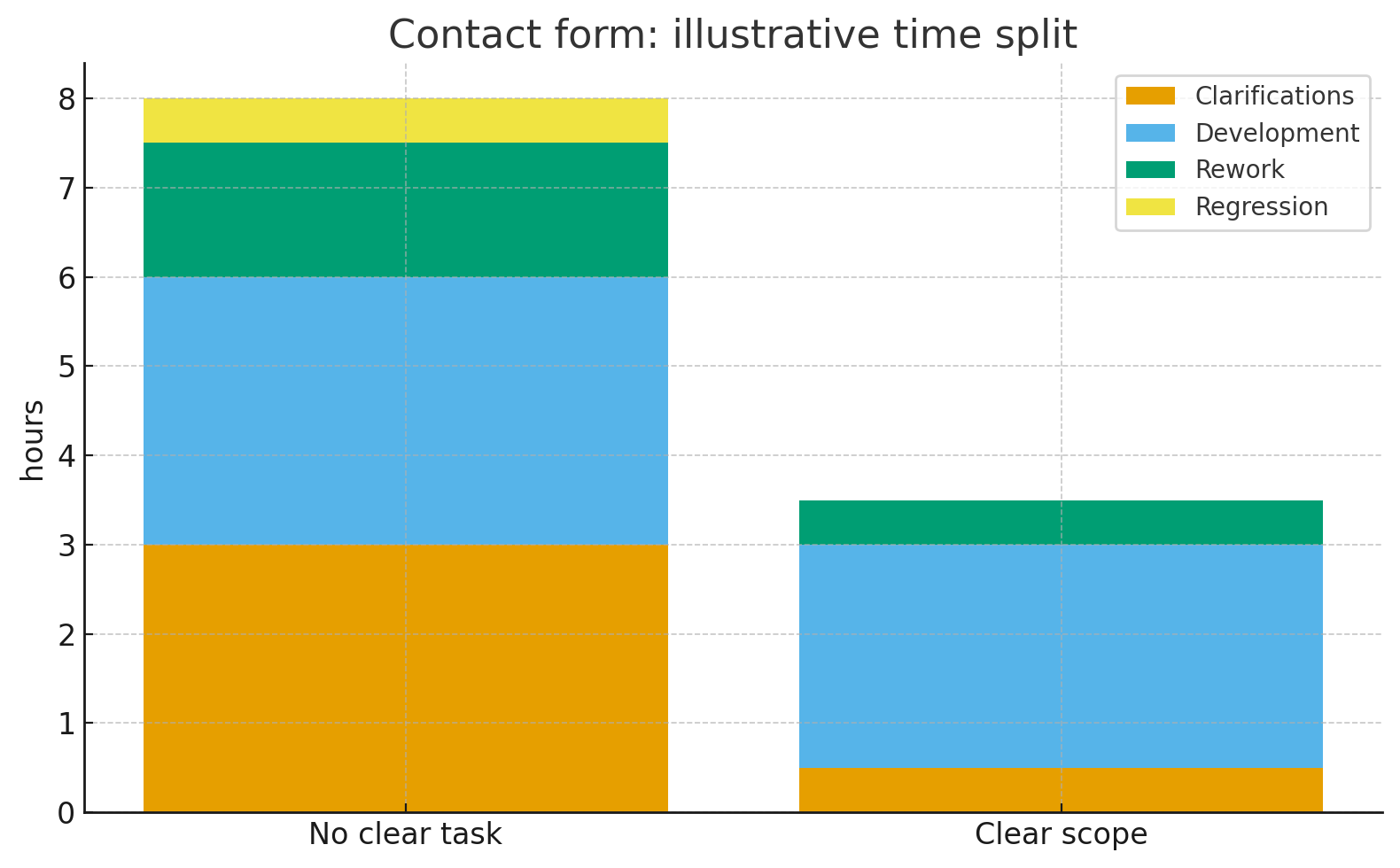
Without a clear task
The scope is "make a form." During work you add a consent checkbox, translations, length limits, anti-spam, a success screen, and an analytics event. Each addition means another round and repeat testing.
With a clear task
- Goal: simple way to contact us; we track the share of successful sends.
- Fields: name (2–100 chars), email, message (≤1000); consent checkbox is required.
- Behavior: clear error messages; on success show "Thanks, we will reply within 1 business day."
- Spam control: up to 3 attempts per hour from one address + hidden honeypot.
- Email: send to support@isapp.be, subject [Contact] Name.
- Done = email sent; success screen shown; empty and error cases handled.
Timing: without a clear task 6–8 hours, with a clear task 3–4 hours.
Bigger example: e-commerce checkout with payments
A contact form is a small task. Here's what happens when the stakes are higher.
Without a clear task
"Build a checkout page with payments." The developer asks twelve questions over three days: which payment provider? Guest checkout or account required? What about failed payments? Stock check before or after payment? The client answers in fragments. The developer builds Stripe integration; the client meant Mollie. Guest checkout was forgotten — added after launch. Total: 60–80 hours, three weeks of back-and-forth.
With a clear task
- Payment: Mollie — card, Bancontact, iDEAL.
- Guest checkout: yes, with optional account creation after payment.
- Success page: order summary + estimated delivery date.
- Failed payment: retry button, keep cart contents for 30 minutes.
- Stock check: before payment — show "out of stock" inline, don't let the user reach checkout.
- Done = order placed, payment confirmed, confirmation email sent, admin notified.
Total: 35–45 hours, no rework. The brief took the client 40 minutes — and saved roughly 25 hours of wasted development time.
How to write a development brief in 15–30 minutes
- Goal and boundaries (5–10 min). Why we do it; what we do not do now.
- Definition of done (5–10 min). What the user should see; which data is valid.
- Look and text (5 min). Sketch, buttons, success/error messages.
- Limits (5 min). Languages, roles, speed/security, spam control, who answers questions.
Common mistakes
Several goals in one task; no out-of-scope; no error/empty states; defining "done" at the end. All of these cause extra rounds and delays.
Mini template (copy and fill)
Why: …
Do now / not now: … / …
Done when: 1) … 2) …
Looks like: link to sketch/screenshot; button and message texts
Limits: languages, roles, speed/security, spam control
Where to send email/data: …
Contact: @name
Writing tasks this way takes practice, but the return is immediate. Google's DORA research (2022) found that good documentation amplifies the impact of every other technical practice by 10–50×. A clear task brief is the smallest unit of that documentation — and it takes fifteen minutes, not fifteen days.
The first time your developer reads a brief and starts building without a single clarification question, you'll know it works. If you're interested in how structured delivery prevents project delays more broadly, Start a Little Slower, Move Much Faster covers the same principle from a planning perspective.
How detailed should a task specification be?
Detailed enough that two developers would build roughly the same thing independently. For a contact form, half a page is enough. For a checkout flow with payments, expect one to two pages. The test is simple: if reading the spec raises no questions, it's detailed enough.
What if requirements change after development starts?
They will. Clear scoping doesn't prevent changes — it makes them cheaper. When the original scope is documented, you can see exactly what changed, estimate the impact, and decide whether it's worth the extra cost. Without a baseline, every change is a surprise.
Who should write the task — the client or the developer?
Ideally, the client describes what they need and the developer structures it into a specification. The client knows the business goal; the developer knows what technical details matter. A 20-minute call plus a written follow-up works well for most tasks.
Is scoping worth it for small tasks under €500?
For tasks under two hours, a clear Slack message or email with the six points from this article is enough — no formal document needed. The habit matters more than the format. Even a five-minute task definition prevents a one-hour misunderstanding.
Get in touch
Have a project
in mind?
Tell us the context and the outcome you want. We’ll reply within 1 business day with the simplest next step (timeline, rough budget, or quick audit).